Slack Emoji Pack
Seventeen reactions of one face, ready to drop into your workspace.

One selfie, nothing else
- Crying laughing

- Heart eyes

- Star struck

- Mind blown

- Partying

- Determined

- Woozy

- Mischief

- Innocent

- Clown

- Pog

- Think smart

- Success

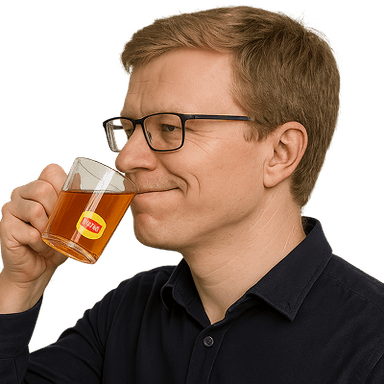
- Sipping tea
- One does not simply

- Cheers

- Tell me more

One photo in, a whole matched set out. Every emote is the same person, so the set reads as a set.
Why a set beats one-off emoji
Custom emoji of actual colleagues are the single most-used thing in most Slack workspaces. One is a joke; a full set of the same person becomes the way your team reacts to everything, because there is finally one for every mood.
Slack has no practical limit on custom emoji, so the constraint is not slots but effort. Uploading a matched set in one sitting is what turns a novelty into something the team actually reaches for.
The emoji Slack users reach for most
- Crying laughing
- Sipping tea
- Think smart
- Determined
- Mind blown
- Innocent
Every pack includes all 17 expressions, not just these. See the full set.
Sized for Slack
Slack emoji are 128×128 px, under 128 KB (PNG or GIF). The ZIP contains a slack folder already at that size, plus 1024px masters.
- 1Generate and download your emoji as a transparent PNG.
- 2In Slack, click the emoji button in any message field, then ‘Add Emoji’.
- 3Upload the PNG, give it a name (e.g. :ship-it:), and save.
- 4React with it or type its name in any channel or DM.
What it would cost otherwise
The usual alternative is an afternoon of someone in the team cutting out photos in an image editor, which produces a set that never quite matches.
- 17 matching emoji of the same face
- Sized and compressed for Slack
- Transparent PNGs, delivered as a ZIP
- Yours to use commercially
- Full refund if any emoji fails
$4.99 for 17 emoji
One photo. Sized for Slack and delivered as a ZIP.
Make your emoji packOne-time payment. Full refund if any emoji fails to generate.
Slack emoji pack questions
What size should Slack emoji be?
Slack wants 128x128 pixels and under 128 KB. The pack's slack folder is already sized and compressed to fit, so nothing gets rejected on upload.
Can I name them myself?
Yes. Slack lets you name each emoji as you upload it, and the pack suggests a shortcode for every expression in the included README.
Is this appropriate for a work Slack?
The expressions are workplace-safe reactions: laughing, celebrating, thinking, determined. Use a photo of someone who has agreed to it, which is the only real rule here.
Can we use these commercially?
Yes, including in company Slack workspaces, internal docs and marketing.